

Parallel workflows
Work on features side by side. No stashing, no branch switching, no conflicts.
Turn your terminal into a multi-agent workspace. Every task gets a dedicated git worktree and tmux window, letting agents code conflict-free.
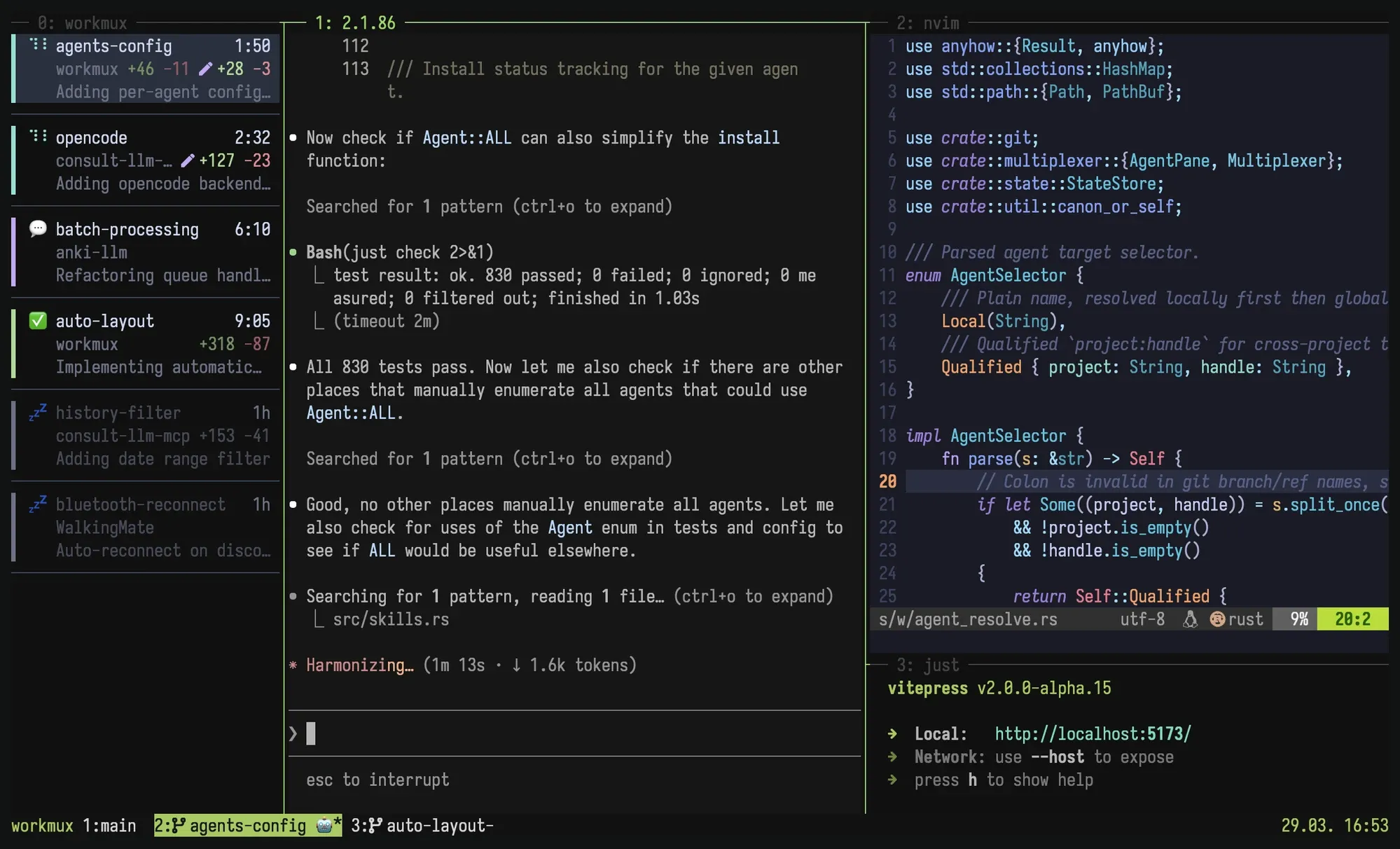
Work on features side by side. No stashing, no branch switching, no conflicts.
A natural mental model. Each has its own terminal state, editor session, and dev server. Context switching is switching tabs.
Build on your familiar terminal setup instead of yet another agentic GUI that will not exist next year. Your tools, your muscle memory.
Git worktrees are powerful, but managing them manually is painful. workmux automates the rough edges.
New worktrees are clean checkouts with no .env, no node_modules, no dev server. workmux can copy config files, symlink dependencies, and run setup commands on creation.
workmux merge handles the full lifecycle: merge the branch, delete the worktree, close the tmux window, remove the local branch. One command. Or go next level and use the /merge skill to let your agent commit, rebase, and merge autonomously.
Conflicts are inherent to git when changes overlap, and worktrees do not change that. But your agent can handle them. The /merge skill tells your agent to rebase onto the base branch, review the upstream changes, and resolve conflicts by understanding both sides. No manual conflict resolution needed in most cases. See finishing work.
Spin up worktrees, develop in parallel, merge and clean up.
Run agents in YOLO mode.
Enable sandboxing to run agents in isolated containers or Lima VMs scoped to the worktree. Host keys, creds, and files stay isolated while agents operate inside the worktree.
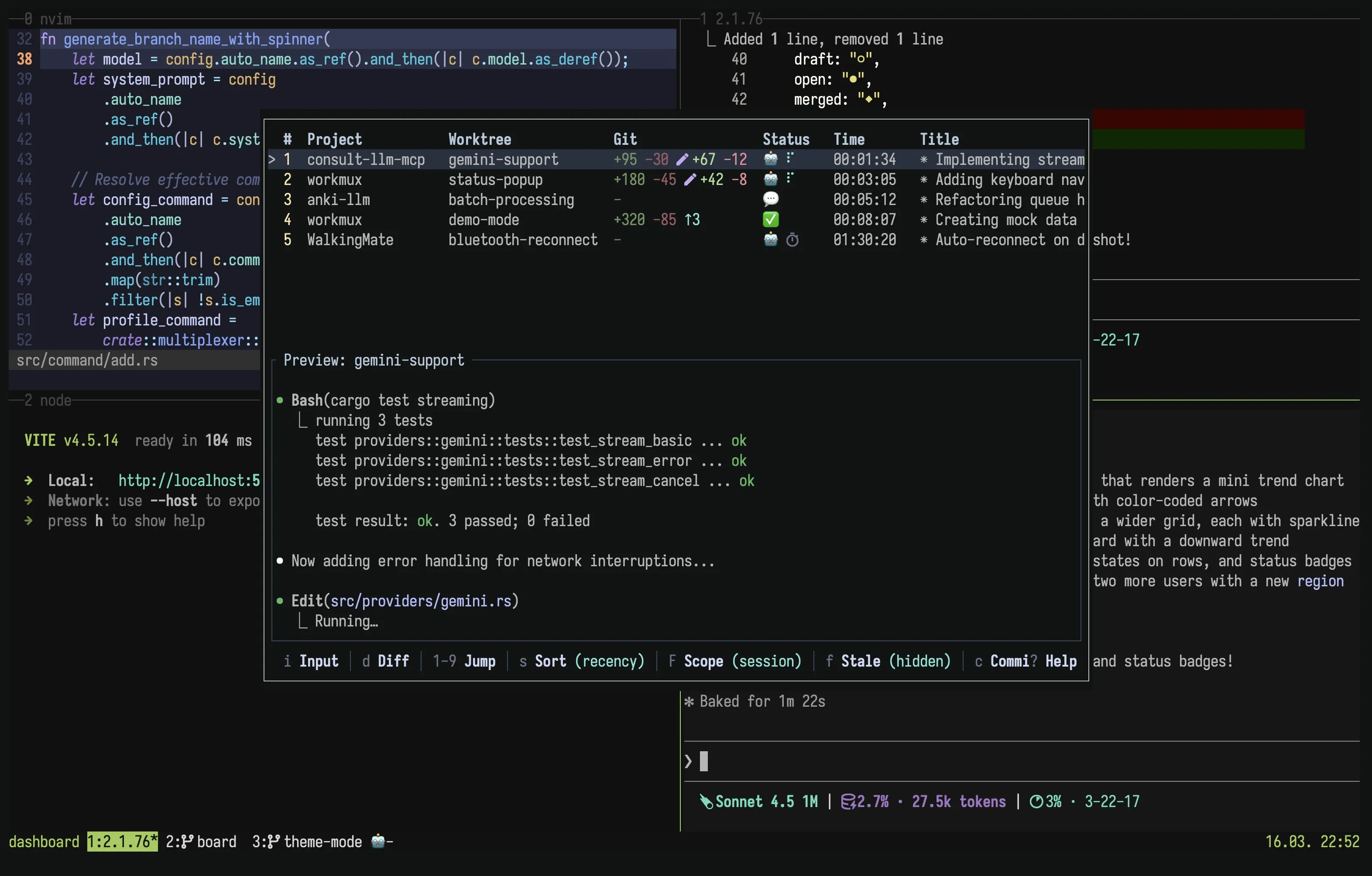
Learn more →A tmux popup dashboard to track progress across all agents.
From a single command to agent orchestration skills.
workmux add -A "Add cursor-based pagination to /api/users"
One command creates a branch, worktree, and starts an agent with your prompt in a new tab.
/worktree Implement the caching layer
From inside an agent, spin off a subtask to a new worktree with full context.
/coordinator Break down the auth refactor into parallel tasks
One agent spawns, monitors, and merges multiple worktree agents.
"I've been using (and loving) workmux which brings together tmux, git worktrees, and CLI agents into an opinionated workflow."
"Thank you so much for your work with workmux! It's a tool I've been wanting to exist for a long time."
"It's become my daily driver - the perfect level of abstraction over tmux + git, without getting in the way or obscuring the underlying tooling."
"I have to mention workmux at every opportunity because it's the perfect glue between worktrees, agents and tmux windows."
"Since I discovered workmux I'm cooking. Amazing parallel-agent driver if you like tmux and want to keep your config."
"Using workmux with a well-configured tmux has been a breath of fresh air"
"I've been using it for about a month now, and it's been nothing but great."
"I still don't see the need for Herdr. Workmux adds busy/question/done status, manages worktrees by itself, and etc. It lives on an already existing tmux setup."
"Want modern terminal workspace features without abandoning your setup? Here is how to keep Tmux and boost your workflow using Workmux."