What is workmux?
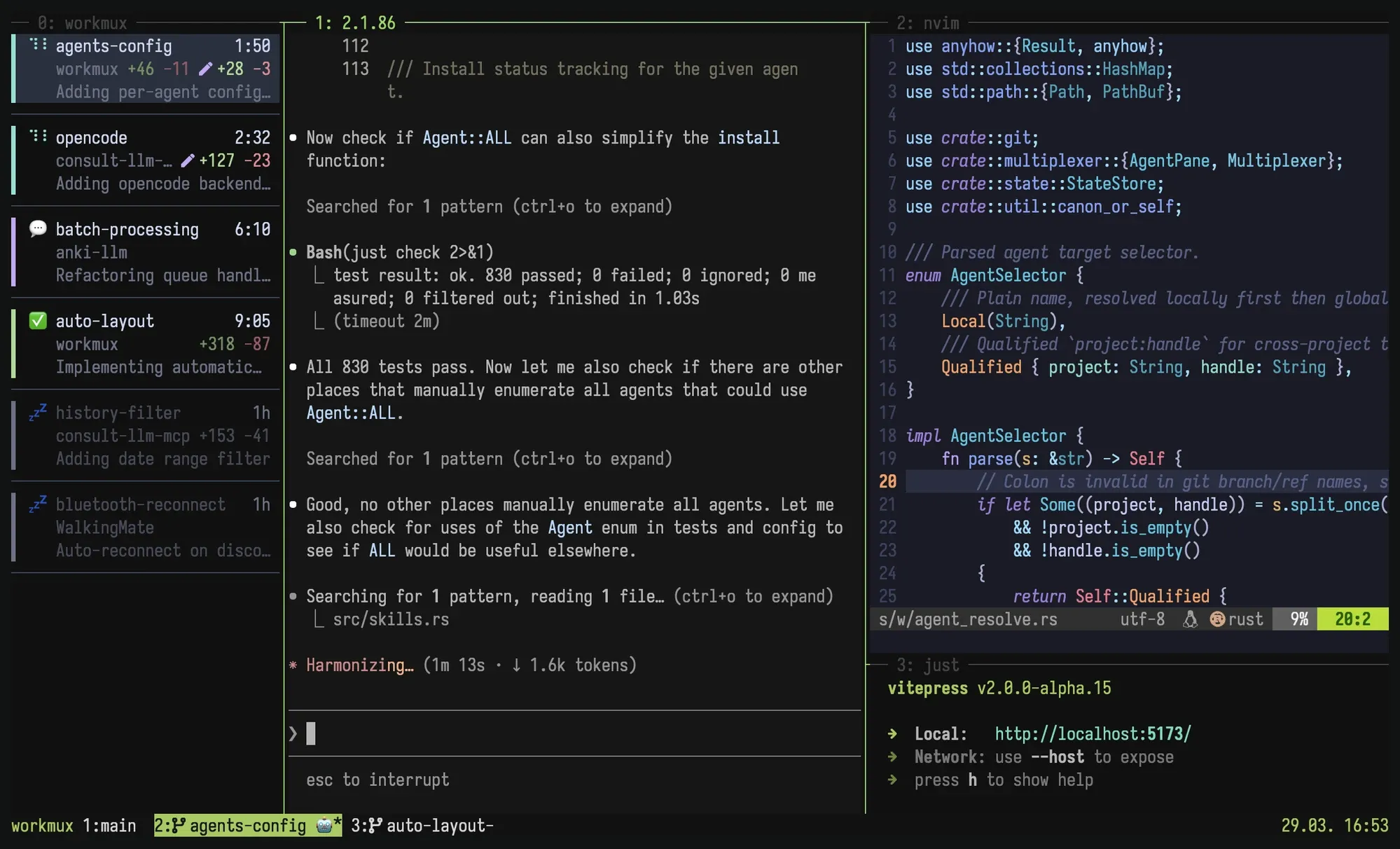
Copy pageworkmux is a giga opinionated zero-friction workflow tool for managing git worktrees and tmux windows as isolated development environments. Also supports kitty, WezTerm, and Zellij (experimental). Perfect for running multiple AI agents in parallel without conflict.
Philosophy: Build on tools you already use. tmux/zellij/kitty/etc. for windowing, git for worktrees, your agent for coding - workmux orchestrates the rest.
Why workmux?
Section titled “Why workmux?”Parallel workflows. Work on multiple features at the same time, each with its own AI agent. No stashing, no branch switching, no conflicts.
One window per task. A natural mental model. Each has its own terminal state, editor session, dev server, and AI agent. Context switching is switching tabs.
Automated setup. New worktrees start broken (no .env, no node_modules,
no dev server). workmux can copy config files, symlink dependencies, and run
install commands on creation.
One-command cleanup. workmux merge handles the full lifecycle: merge the
branch, delete the worktree, close the tmux window, remove the local branch. Or
go next level and use the /merge skill to let your
agent commit, rebase, and merge autonomously.
Terminal workflow. Build on your terminal setup instead of yet another agentic GUI that won’t exist next year. If you don’t have one yet, tmux might be worth picking up. Also supports Kitty, WezTerm, and Zellij.
 Worktrees
Features
Section titled “Features”- Create git worktrees with matching tmux windows (or kitty/WezTerm/Zellij tabs)
in a single command (
add) - Merge branches and clean up everything (worktree, tmux window, branches) in
one command (
merge) - Dashboard for monitoring agents, reviewing changes, and sending commands
- Delegate tasks to worktree agents with a
/worktreeskill - Display Claude agent status in tmux window names
- Automatically set up your preferred tmux pane layout (editor, shell, watchers, etc.)
- Run post-creation hooks (install dependencies, setup database, etc.)
- Copy or symlink configuration files (
.env,node_modules) into new worktrees - Sandbox agents in containers or VMs for enhanced security
- Automatic branch name generation from prompts using LLM
- Shell completions
Before and after
Section titled “Before and after”workmux turns a multi-step manual workflow into simple commands, making parallel development workflows practical.
Without workmux
Section titled “Without workmux”# 1. Manually create the worktree and environmentgit worktree add ../worktrees/user-auth -b user-authcd ../worktrees/user-authcp ../../project/.env.example .envln -s ../../project/node_modules .npm install# ... and other setup steps
# 2. Manually create and configure the tmux windowtmux new-window -n user-authtmux split-window -h 'npm run dev'tmux send-keys -t 0 'claude' C-m# ... repeat for every pane in your desired layout
# 3. When done, manually merge and clean everything upcd ../../projectgit switch main && git pullgit merge --no-ff user-authtmux kill-window -t user-authgit worktree remove ../worktrees/user-authgit branch -d user-authWith workmux
Section titled “With workmux”# Create the environmentworkmux add user-auth
# ... work on the feature ...
# Merge and clean upworkmux mergeWhy git worktrees?
Section titled “Why git worktrees?”Git worktrees let you have multiple branches checked out at once in the same repository, each in a separate directory. This provides two main advantages over a standard single-directory setup:
-
Painless context switching: Switch between tasks just by changing directories (
cd ../other-branch). There’s no need togit stashor make temporary commits. Your work-in-progress, editor state, and command history remain isolated and intact for each branch. -
True parallel development: Work on multiple branches simultaneously without interference. You can run builds, install dependencies (
npm install), or run tests in one worktree while actively coding in another. This isolation is perfect for running multiple AI agents in parallel on different tasks.
In a standard Git setup, switching branches disrupts your flow by requiring a
clean working tree. Worktrees remove this friction. workmux automates the
entire process and pairs each worktree with a dedicated tmux window, creating
fully isolated development environments.
Requirements
Section titled “Requirements”Inspiration and related tools
Section titled “Inspiration and related tools”workmux is inspired by wtp, an excellent git worktree management tool. While wtp streamlines worktree creation and setup, workmux takes this further by tightly coupling worktrees with tmux window management.
For managing multiple AI agents in parallel, tools like claude-squad and vibe-kanban offer dedicated interfaces, like a TUI or kanban board. In contrast, workmux adheres to its philosophy that tmux is the interface, providing a native tmux experience for managing parallel workflows without requiring a separate interface to learn.
Related projects
Section titled “Related projects”- tmux-tools - Collection of tmux utilities including file picker, smart sessions, and more
- tmux-file-picker - Pop up fzf in tmux to quickly insert file paths, perfect for AI coding assistants
- tmux-bro - Smart tmux session manager that sets up project-specific sessions automatically
- claude-history - Search and view Claude Code conversation history with fzf
- consult-llm-mcp - MCP server that lets Claude Code consult stronger AI models (o3, Gemini, GPT-5.1 Codex)