

Diff view
Copy pagePress d to view the diff for the selected agent. The diff view has two modes:
- WIP - Shows uncommitted changes (
git diff HEAD) - review - Shows all changes on the branch vs main (
git diff main...HEAD)
Press Tab while in diff view to toggle between modes. The footer displays which mode is active along with diff statistics showing lines added (+) and removed (-).
When delta is installed, diffs are rendered with syntax highlighting for better readability. Without delta, basic diff coloring is used as a fallback.
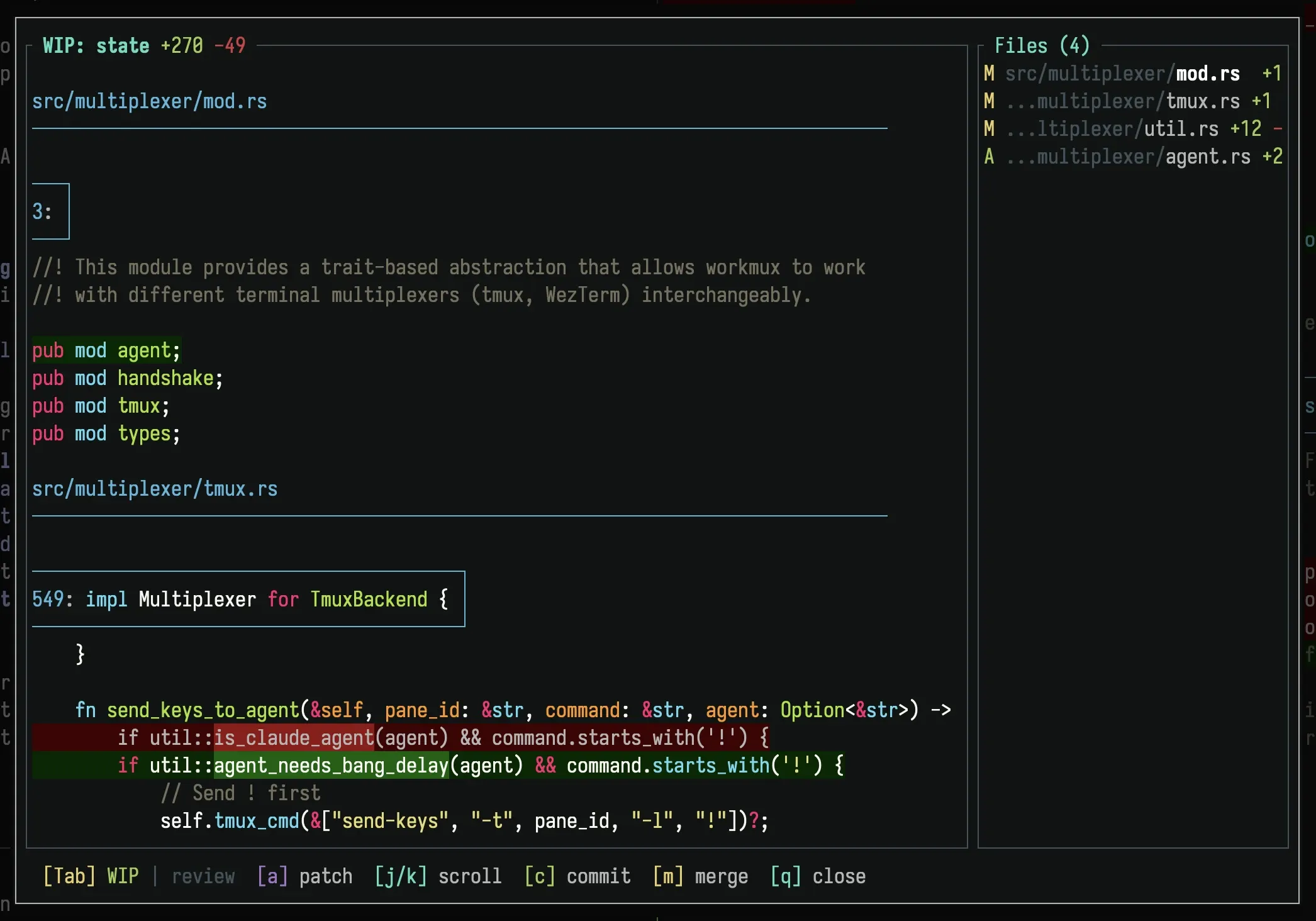
Diff view showing WIP changes across multiple files
If there are no changes to show, a message is displayed instead:
- WIP mode: “No uncommitted changes”
- Review mode: “No commits on this branch yet”
Keybindings
Section titled “Keybindings”| Key | Action |
|---|---|
Tab |
Toggle WIP / review |
a |
Enter patch mode (WIP only) |
j/k |
Scroll down/up |
Ctrl+d |
Page down |
Ctrl+u |
Page up |
c |
Send commit action to agent |
m |
Send merge action to agent |
: |
Open command palette |
q/Esc |
Close diff view |
Ctrl+c |
Quit dashboard |
The c and m actions can be configured to run custom commands or prompts.