

Sidebar
Copy pageThe sidebar provides an always-visible agent overview pinned to the left edge or top edge of every tmux window. Unlike the dashboard, which is a full-screen TUI you open on demand, the sidebar stays on screen while you work.
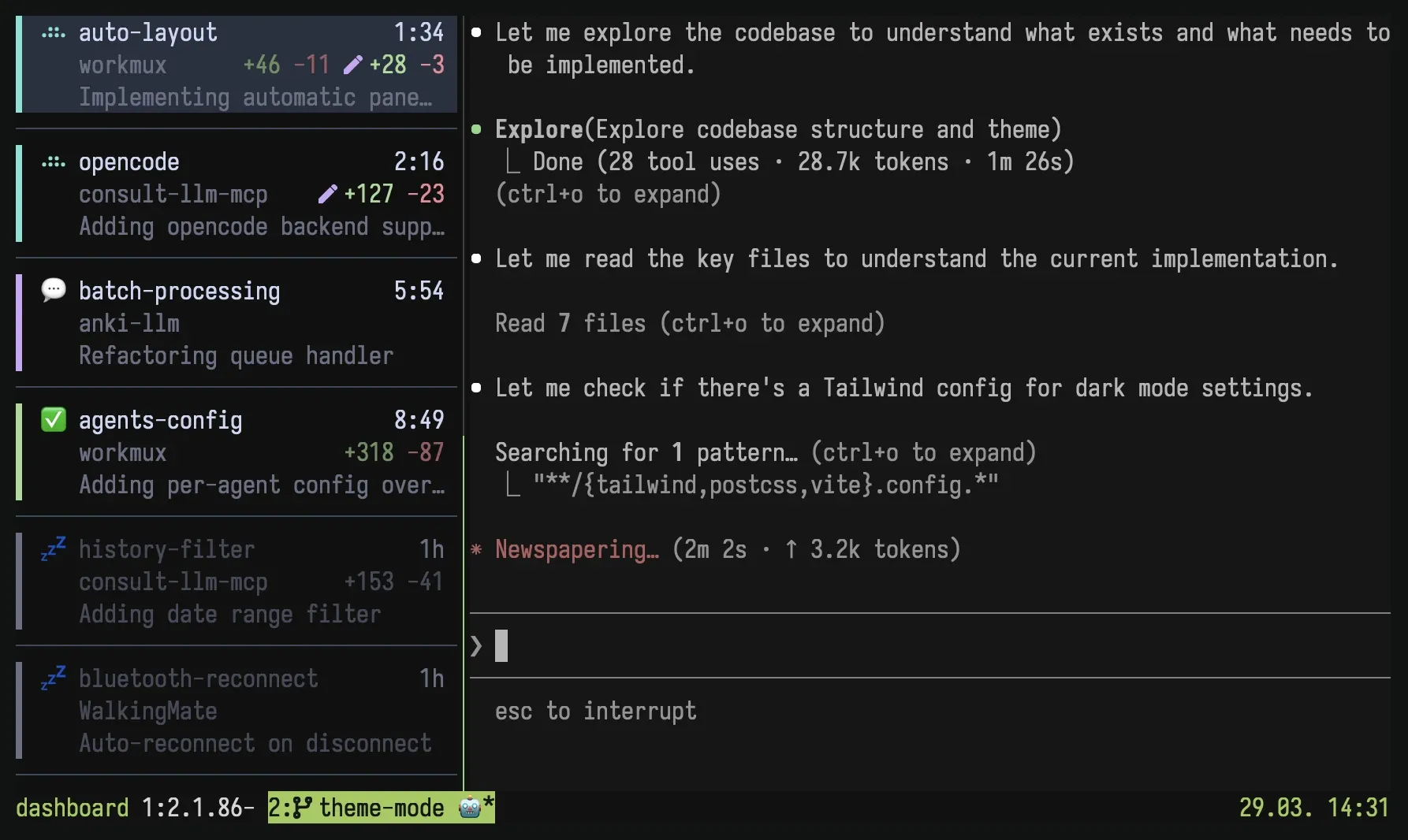
Toggle the sidebar with:
workmux sidebar # All sessions (default)workmux sidebar --session # Current session only, or opt out of global modeworkmux sidebar --position top # Override configured placement for this toggleBy default, the sidebar appears in all existing and newly created tmux windows
across all sessions. Use --session to scope it to the current session only,
leaving other sessions untouched. Use --position left or --position top to
override the configured placement when enabling the sidebar. Running the command
again disables it.
When the global sidebar is active, workmux sidebar --session hides it in the
current tmux session only. Run it again to show the sidebar in that session
again without affecting other sessions.
Optionally, add a tmux binding for quick access:
bind C-t run-shell "workmux sidebar"What it shows
Section titled “What it shows”Each agent is displayed as a tile showing:
- Status icon with spinner animation (working/waiting/done)
- Worktree name and elapsed time since last status change
- Project name and git diff stats (committed + uncommitted lines)
- Optional pull request number and check status for the current branch
- Agent task description
The exact layout, styling, and per-agent icons are fully customizable; see Customization.
Configuration
Section titled “Configuration”Configure the sidebar in your global ~/.config/workmux/config.yaml or project
.workmux.yaml:
sidebar:  # Position: "left" (default) or "top"  position: left
  # Left sidebar width: absolute columns or percentage of terminal width  width: 40 # absolute columns  # width: "15%"  # percentage of terminal width
  # Layout mode for the left sidebar: "compact" or "tiles" (default)  layout: tiles
  # Dim agents whose status has not changed for one hour (default: true)  dim_stale: true
  # Row ordering: "recency" (default, most recent status change first)  # or "window" (tmux window order - stable rows that match the window  # list, pairs well with the {window_index} template token)  sort: recency
For a horizontal top bar:
sidebar:  position: top
  # Top bar height in rows  height: 3
  horizontal:    item_width: 24 # horizontal chip width in columns
  templates:    horizontal:      - "{status_icon} {primary} {pane_suffix} {fill} {elapsed}"      - "{secondary} {fill} {git_stats}"      - "{pane_title}"
Width defaults to 10% of terminal width, clamped between 25 and 50 columns.
When set explicitly, the clamp is removed (minimum 10 columns). Widths above
80 columns use the default width so tmux pane expansion recovers automatically.
Height only applies to position: top; set it as a row count for the number of
horizontal lines you want to show. Horizontal item width defaults to 24 columns
and is clamped between 12 and 80. Position changes take effect the next time you
toggle the sidebar off and on. Use workmux sidebar --position top or
--position left to override the configured placement for that toggle.
Layout modes
Section titled “Layout modes”The left sidebar supports two layout modes, toggled with v:
- Tiles (default): variable-height cards with status stripe
- Compact: single line per agent
Tiles show a muted ↓ N more footer when agents remain below the visible area.
The count includes only hidden agents, not agents above the viewport. The footer
is not selectable and disappears when the final agent is visible. On very short
sidebars, showing the selected tile takes priority over the footer.
Your preference is persisted across tmux restarts. The top bar always uses a
horizontal chip layout, so v has no effect there. Horizontal templates render
as many configured lines as the current height allows.
Mouse support
Section titled “Mouse support”Click an agent tile or top-bar chip to jump to its pane, or scroll to navigate
the list. Requires set -g mouse on in your ~/.tmux.conf.
Keybindings
Section titled “Keybindings”| Key | Action |
|---|---|
j/k |
Navigate up/down |
Enter |
Jump to agent pane |
g/G |
Jump to first/last |
v |
Toggle layout mode |
f |
Toggle session filter |
z |
Toggle sleeping on agent |
q |
Open quit confirmation |
Session filter
Section titled “Session filter”By default, the sidebar shows agents across all tmux sessions. Press f to
show only agents in the same tmux session as the current window; press f again
to return to all sessions.
The filter also applies to agent navigation hotkeys (next/prev/jump), so
Alt+j/Alt+k cycle through the current session when the session filter is
active.
You can also toggle the filter from the command line:
workmux sidebar filter # Toggle between none and sessionworkmux sidebar filter session # Filter to current sessionworkmux sidebar filter none # Show all agents (no filter)Sleeping agents
Section titled “Sleeping agents”Press z to manually mark an agent as sleeping. Sleeping agents show a 💤 icon
with dimmed colors and are pushed to the bottom of the list, regardless of their
actual status. This is useful for temporarily deprioritizing agents you don’t
need to monitor. Press z again to wake them up.
Agent navigation hotkeys
Section titled “Agent navigation hotkeys”You can switch between agents from any tmux pane using subcommands. These work in the same order shown in the sidebar:
| Command | Action |
|---|---|
workmux sidebar next |
Switch to the next agent (wraps) |
workmux sidebar prev |
Switch to the previous agent (wraps) |
workmux sidebar jump <N> |
Jump to the Nth agent (1-indexed) |
Example tmux keybindings
Section titled “Example tmux keybindings”# Alt+j / Alt+k to cycle agents (no prefix needed)bind -n M-j run-shell "workmux sidebar next"bind -n M-k run-shell "workmux sidebar prev"
# Alt+1..9 to jump directlybind -n M-1 run-shell "workmux sidebar jump 1"bind -n M-2 run-shell "workmux sidebar jump 2"bind -n M-3 run-shell "workmux sidebar jump 3"# ...How it works
Section titled “How it works”The sidebar is a bit of a hack on top of tmux’s pane system, but it works quite well. It uses a daemon + client architecture with event-driven rendering:
-
Toggle on (
workmux sidebar): creates a tmux pane on the left or top edge of every window, starts a background daemon, and installs tmux hooks. -
Daemon: a single headless process that polls tmux state every 2 seconds (or immediately when signaled via SIGUSR1). It reads agent state from a context-scoped filesystem cache, queries tmux for pane geometry and active windows, then pushes snapshots to all connected sidebar clients over a Unix socket. Unchanged records are reused without loading or parsing their JSON.
-
Clients: every tmux window gets its own sidebar pane running a separate
workmux _sidebar-runprocess. Each process connects to the shared daemon socket, receives snapshots via a background reader thread, and renders independently. The main thread blocks on a channel, only waking when new data arrives or a spinner tick is needed. Rendering is skipped entirely for inactive windows. This event-driven design keeps CPU usage near zero when idle. -
Hooks: tmux hooks handle lifecycle events:
after-new-window/after-new-session: automatically adds a sidebar pane to newly created windowswindow-resized: reflows the layout tree in every sidebar window, keeping all sidebars at the correct width or height regardless of which window was resizedafter-select-window/client-session-changed/after-kill-pane: signals the daemon for an immediate refresh
-
Layout reflow: when the sidebar is added or the terminal is resized, a layout tree parser reads the tmux
#{window_layout}string, scales the content subtree proportionally, and applies the result atomically viaselect-layout. This preserves existing pane proportions (e.g. a 70/30 split stays 70/30). -
Toggle off: kills all sidebar panes, reflows content panes to fill the freed space, stops the daemon, and removes hooks.
Resource usage
Section titled “Resource usage”Because tmux has no concept of a pane that persists across all windows, each
window runs its own _sidebar-run process. Each one uses roughly 15 MB of
resident memory, and the shared daemon (_sidebar-daemon) uses about 16 MB. With
five agents running, total memory footprint is around 90 MB. CPU usage is near
zero when idle thanks to the event-driven architecture.